 Christmas Mega Sale – Enjoy Up to 50% OFF on Every Plan!
The speed of the website has moved beyond just being a technical parameter. SEO success and user experience dictate search visibility as we move through the year of 2026. Google’s core web vitals optimization are no longer just a checklist but have become a key ranking factor directly impacting rankings, conversions, and customers’ trust in your website and this core web vitals optimization guide will make it more clear and break down the complexities for website owners and developers.
In 2026, if your website is still slow and unpredictable and offers sluggish user experience the brutal truth is your business is losing revenue.
Whether you are running a blog, a Saas platform, e-commerce store or a website for an agency you aim to be a perfect pagespeed to dominate SERP this core web vitals optimization guide will help you master the art of improving pagespeed of your website without a developer and deliver measurable results.
This detailed core web vital optimization guide will explore steps and provide actionable insights and directions to optimize metrics like Largest contentful paint (LCP), cumulative layout shift (CLS) and interaction to next paint (INP) for improved performance, better SEO rankings, reduce bounce rates and improve your speed scores with a strategy that delivers exceptional user experience.
This comprehensive core web vital optimization guide will explore:
- What are core web vitals?
- Importance of core web vitals for SEO.
- Improvement steps for LCP, CLS and INP.
- Performance measurement tools.
- Optimization steps for WordPress.
- Mistakes that affect your website speed.
- Practical insights to improve website performance.
Understanding Core Web Vitals (LCP, CLS & INP) and Their Impact on SEO: A Core Web Vitals Optimization Guide
A set of real-world user experience metrics used to measure a webpage’s overall speed, visual stability, and responsiveness by Google is known to be the Core Web Vitals. The signals influence organic rankings and form a major part of Google’s page experience signals.
The three main pillars of Core Web vitals that affect your website SEO rankings are:
1. Largest Contentful Paint (LCP)
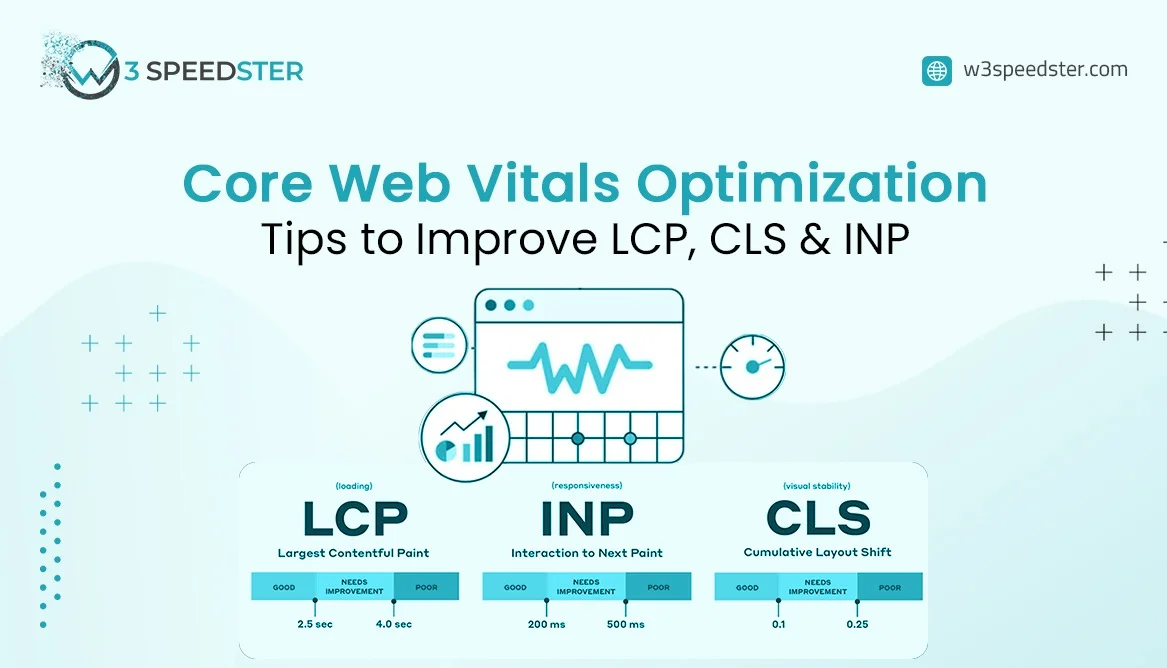
LCP is nothing but the measurement and evaluation of the time taken by the website to load by evaluating the time taken for the main content of the page to load. The good threshold timings for LCP are ≤ 2.5 seconds.
2. Cumulative Layout Shift (CLS)
CLS measures the stability and unpredictability of the visuals or elements when the page loads by tracking the unexpected shifts of the elements on screen during loading. The ideal score for CLS is ≤ 0.1.
3. Interaction to Next Paint (INP)
INP is the measure of interactivity and responsiveness of the website, by measuring how quickly a page reacts to user-like clicks, taps, and keyboard inputs. First input delay (FID) was replaced by interaction to next paint (INP), and the ideal score is INP: ≤ 200 ms.
Website pages that pass this threshold for all the above metrics on actual user data (CrUX report) often see up to 24% lower bounce rates, higher rankings, and better engagement.
These metrics are used by Google to assess broader page experience optimization directly influencing website visibility and usability. These data metrics are fetched by Google from Chrome experience user report (CruX) and good scores for the page is at least 75% of real users to pass.
How Do You Test Your Website’s Core Web Vitals Scores for LCP, CLS & INP?
It is crucial to understand the analysis of score before you start working on the solution. If something cannot be measured it is difficult to fix. If you are chasing improved pagespeed for your website the first step is to check the current metrics of core web vitals of your website. The below tools help you utilize both the real world data and lab data (Stimulated experiences).
So before you start to optimize, it is important to analyse your current website performance. Use these tools for an accurate assessment.
- Google Page Speed Insights.
- Google Search Console.
- Web vitals Chrome extension or Lighthouse.
- Chrome User Experience Report.
Google PageSpeed Insights:
This tool helps you analyze both mobile and desktop performance for your website and is one of the most popular tools that provide practical insights and data to improve your pagespeed scores.
Google Search Console:
Commonly known as GSC, it offers a dedicated core web vitals report and a complete view of your website performance with real user CWV data across your website. It also groups the problematic URLs causing performance issues.
Lighthouse:
Built to run directly into Chrome Dev tools is an excellent tool for developers seeking testing lab data reports in an environment that is controlled. It provides detailed audits by using USER FLOW for INP simulation.
Chrome UX Report (CruX):
Chrome UX report provides consolidated data collected from Chrome users that reflect real world user experience across millions of websites unlike synthetic testing tools.
These are the most reliable tools that help you identify issues that are related to LCP, CLS or INP and helps you monitor recommendations to improve core web vitals.
Do Core Web Vitals Affect Google Rankings? What LCP, CLS & INP Mean for SEO
One of the most common questions faced by developers and website owners is if core web vitals affect the ranking of their website on google and to answer this it is a big YES. Google’s core web vitals plays an important role in SEO and page experience optimization of your website and is one of the confirmed metrics for ranking of your website in 2026. With official integration and incorporation of core web vitals metrics in 2021, these are part of user experience signals measured on the basis of content relevance, quality and authority.
Core Web vitals signals are measured on the basis of data from real world conditions like Largest contentful pain (LCP), cumulative layout shift (CLS) and Interaction to next paint (INP). These three pillars of core web vital signals play a meaningful role in how a website page is evaluated and ranked.
While high quality content on websites and intent based search remains a dominating factor in ranking of websites, these factors emerge as a competitive edge for website owners when two pages offer similar content.
A website with good LCP, INP and CLS scores helps you improve user satisfaction, reduce bounce rates and increase engagement with users, all of which combined contributes positively to SEO performance helping Google reward your site with better search visibility.
In 2026, For business, e-commerce stores, bloggers, publishers and SaaS platforms ignoring core web vitals can silently push your website and well optimised pages down in SERPs. Core web vitals are not just about ranking your website higher on google but more about delivering best in class user experience leading to long term organic growth and increased user interaction.
Practical Tips to Fix LCP and Improve Your Core Web Vitals Performance
LCP measures the largest content element (A hero image, video, or text block) by marking the point in the page load time. The primary factors directly causing the issues with LCP are slow servers, unoptimized images, heavy scripts, or rendering block resources, creating a poor first impression.
Strategies to Improve LCP:
Optimize images aggressively:
Remove render blocking Java scripts and CSS. Defer non-critical JS and inline critical CSS. Also optimize database queries. Target TTFB under 200-500ms.
Prioritize the LCP Image:
Avoid lazy loading of the LCP element if that is an image. Use next-gen formats like WebP/AVIF, and compress files. Preload the LCP image with link rel=”preload” fetchpriority=”high.
Consider modern rendering:
For faster initial content, use server-side rendering (SSR) or static generation.
Modern Image Formats:
Compress heavy images and use them in next-gen formats like WebP or AVIF instead of heavy JPEGs.
Following all the steps above will help you push your LCP under the target of 2.5 seconds, improving page speed scores.
Proven Methods to Improve INP and Boost Your Core Web Vitals Responsiveness
Fixing your CLS is crucial to achieving visual stability on your website. The main reasons for a poor CLS score is images/videos without dimensions, injected contents like ads or banners, web fonts causing FOIT/FOUT, and late loading of third-party widgets. Poor CLS results in frustration and lost trust, and makes the website look unstable.
Strategies to Reduce Layout Shifts:
Accurate Image Dimensions:
Set fixed dimensions for your images, videos, and in-frame elements. Always specify width and height attributes, as it reserves the correct aspect ratio box before download of assets.
Allocate Space for Dynamic Ads and Widgets:
Use placeholders and skeleton loaders for programmatic ads or embeds. Predefine the minimum height and wrap it into a container to prevent the content below from jumping down when the ad loads.
Optimise font loading with CSS (font-display: swap):
The custom web fonts and the fallback fonts should share similar dimensions, which helps prevent flash of invisible text (FOIT) and flash of unstyled text (FOUT) from shifting.
Mastering the ideal score of CLS under 0.1 boosts the confidence of the users and contributes to better results in core web vitals ranking signals.
Proven Methods to Improve INP and Website Responsiveness
INP refers to the measurement of a page’s overall responsiveness to interactions of visiting users throughout its entire lifecycle. INP replaced the first input delay (FID), making INP the most comprehensive and challenging. The leading factors contributing to poor INP are heavy event listeners, large JavaScript bundles, excessive re-renders, and third-party scripts.
Methods to Optimize Page Responsiveness
Split long Tasks:
Break longer tasks into smaller chunks by using requestIdleCallback or webworkers. Any JavaScript tasks taking longer than 50ms are long tasks that cause the main thread to block. Use synchronous tasks to execute patterns like setTimeout() or requestIdleCallback().
Reduce and Delay Non-Essential JavaScript Loading
Use code splitting to remove non essential java script, minify bundles, and audit your plugins or scripts so they don’t choke the main thread during user interactions. Also defer third-party scripts (Analytics or widgets) and remove unused code.
Improve Event Handler Efficiency
Minimize DOM manipulations during interactions and ensure your JavaScript event listeners, like scroll or click handlers, run lean. If visual updates are required, use requestAnimationFrame.
Common Mistakes Hurting Your Core Web Vitals and PageSpeed Scores
To achieve a pagespeed that is considered as flawless speed is like chasing a moving target as many websites that are handled and managed by experienced developers and SEO professionals are still struggling to pass Google’s core web vitals.
This happens not because of a single issue but a broader collection of performance mistakes that are very common especially when you are managing technical SEO, development pipelines and user experience designs.
These common mistakes silently destroy your pagespeed and google rankings due to poor user experience over time. Many website owners spend countless hours changing their code or some heavily depend on backlinks and content and still find their google console in red warning banners. This puts the website owners in a questionable situation. Why does this happen?
The real factor is most under performing or non performing sites are not facing just one massive issue but a combination of multiple common mistakes that impacts the overall pagespeed and ranking of the websites.
Understanding the small but most impactful mistakes that drag your website performance down is very crucial to take the first step towards the improvement. Below are the most common but most crucial mistakes that damage your core web vitals drawn after analysing and close observation of hundreds of live and real world projects.
1. Not fixing mobile specific issues for your website:
Website owners ignore performance of their website on mobile and focus only on data from desktop performance however Google core web vital evaluates mobile user experience in the first place. Always look for optimisation of your website for slow connections, mid range mobile devices or tablets, responsiveness on touch or clicks on mobile devices and loading of your site on smaller screens.
2. Excessive use of Plugins:
Adding too many optimization plugins on your website is like creating new problems everyday. Overuse of plugins on your website generates extra scripts and database overhead that render delays and creates javascript conflicts. For best performance of your website rely on minimal setups.
3. Unoptimised images:
Uploading large size unoptimised hero images or carousels often damages mobile performance of your website. Instead try uploading or using images that offer full resolution and the ones that can be compressed. Avoid using images that are of outdated formats and miss lazy loading.
4. Heavy theme or Animations:
Excessive usage of themes or animation on your website without tuning the performance can significantly impact the core web vitals of your site as it damages INP and increases the CPU usage causing instability in layouts and reduces the mobile responsiveness drastically. Usage of simple or subtle animations boosts your site performance rather than excessive motion effects.
Above are the most common website mistakes that drag your pagespeed down significantly affecting your websites SEO ranking and delivering poor user experience. Other common issues are relying solely on lab or synthetic core web vitals data of your website and neglecting ongoing monitoring after primary fixes on your website.
Core Web Vitals Optimization for WordPress: Fix LCP, CLS & INP Issues
With over 43% of powering the total web, flexibility in WordPress often comes at a cost that affects performance. Optimization of core web vitals for a WordPress website requires a tactical approach as it requires integration of speed improvements, resource optimization and improved server performance.
WordPress websites generally do display inherent platform bloat,heavy page builders and clutter of plugins. With the strategic combination of using the right plugins, hosting and configuration you can drastically reduce server response time and lower your Time to first byte (TTFB).
The first step to improve core web vitals for your WordPress site is to choose modern and lightweight themes and audit your hosting provider. With removal of non required plugins that add excessive CSS and javascripts implement a powerful caching plugin such as W3Speedster which automatically helps you cache, reducing server load and improving loading time of your website pages.
Additionally usage of optimised images are equally important. Usage of modern image formats like WebP/AVIF, compressing large files and enabling lazy loading dramatically improves the largest contentful pain (LCP). Ensure your media settings and automated plugins are within the right height and width to fix cumulative layout shifts.
Delay third party scripts and break long tasks into smaller ones to tackle interaction to next paint (INP) by using asset management plugins.
With correct implementation you can transform your wordpress website into highly responsive and user friendly search engine ready assets. These corrective measures will help you get your site into the green zone while improving LCP, CLS and INP and to maintain your site performance and seamless user experience across all devices.
Complete PageSpeed and Core Web Vitals Optimization Strategies with W3Speedster
You require baseline data before you start implementing the solutions for improving your website speed. Trusted online tools like Google Pagespeed Insights, Lighthouse Chrome, and user experience help you gain actionable insights about your current website speed diagnostics.
If you are seeking to improve page speed score, raw data collected from the above tools is just a simulation that doesn’t solve speed issues. If you are genuinely interested to optimise website performance, you must choose the right implementation that fixes real-world field data. This is where w3Speedster excels.
Step-by-Step Optimization with W3 Speedster:
Monitor and Evaluate Website Performance Metrics:
Identify your weakest metrics by running baseline tests on Pagespeed insights like LCP, CLS, or INP.
Streamline Asset Optimization Automatically
Instantly slash your LCP timings by using W3 Speedster’s WebP/AVIF image converter, automated image resizer, and lazy loading features.
Eliminate bloating of code: Maximize your INP responses by generating critical CSS with W3 Speedster, fixing the rendering blocking resources, and minifying and deferring non-required JavaScripts.
Improve Layout Stability Across Pages
W3 Speedster offers built-in asset dimension injection and optimization of font loading configurations, a feature that prevents sudden shifts in layouts.
While DIY efforts help, W3 Speedster offers AI-powered optimization features and serves as your all-in-one performance engine that handles image optimization, critical CSS extraction, lazy loading, and more, delivering 3x faster loading times, making your Google Search Console transform into a sea of good URLs.
Ready to Achieve Professional-Level Core Web Vitals and PageSpeed Performance?
Core web vitals in 2026 are not a one-time fix but an ongoing commitment to quality and an enhanced user experience. W3 speedster seamlessly integrates into WordPress, Laravel and other platforms to automatically fix LCP, CLS, and INP and ensures a frictionless experience, keeping your users and website visitors engaged for a longer period of time.
With helping thousands of websites achieve 99% improvement and satisfaction in pagespeed scores and SEO performance, let W3 speedster handle your asset compression, script management, and critical CSS generation.
Want to experience skyrocketing conversions and 10/10 website performance? Book a free consultation today and transform your website.
Core Web Vitals FAQs: LCP, CLS, INP and PageSpeed Explained
Q1. What are Core Web Vitals?
Core Web Vitals are Google performance metrics measuring loading speed, visual stability, and responsiveness. With CLS, INP and LCP compromising three main factors that decide the user experience and responsiveness of the website. These core web vital signals are directly linked to the SEO ranking of the website.
Q2. Is Core Web Vitals a ranking factor?
Yes, Google officially uses Core Web Vitals as part of its page experience ranking signals. Integrated in the year of 2021, Core web vitals continues to be an important and meaningful contributor when it comes to SERP and SEO rankings.
Q3. What is a good LCP score?
A good Largest Contentful Paint score is under 2.5 seconds. If LCP for your site is under 4 seconds your site needs improvement and if it is above 4 seconds your site is performing poorly and you are probably losing revenue and rankings are dropping for your site.
Q4. How do I fix CLS issues?
You can fix CLS by reserving space for images, avoiding layout injections, and optimizing font loading as it helps your site to be visually stable and to avoid users losing reading position. A stable website creates a better browsing experience leading to high user interaction.
Q5. What causes poor INP scores?
Heavy JavaScript execution, third-party scripts, and long main-thread tasks commonly cause poor INP scores. Poor INP scores lead to lower responsiveness of websites to user interaction and poor user experience.
Q6. Does JavaScript affect Core Web Vitals?
Yes, excessive JavaScript negatively affects both LCP and INP as it leads to decreased interaction to user click or touch making your website feel laggy or sluggish delivering poor user experience and directly impacting the core web vitals.
Q7. How can I improve my PageSpeed Insights score?
Improve images, reduce scripts, enable caching, use a CDN, and optimize server performance for better pagespeed scores. Use popular tools to check for current metrics and follow the particle steps as mentioned in the blog for improving core web vital scores for your website.
Q8. Are Core Web Vitals important for mobile SEO?
Yes, mobile performance is extremely important because Google primarily evaluates mobile page experience. Fixing core web vitals for your site so it can perform better on smaller screens is very crucial for ranking your site better on Google search engine.
Q9. What tools measure Core Web Vitals?
Popular tools include:
Google PageSpeed Insights
Lighthouse
Chrome UX Report
Google Search Console
These tools help you with real user data and also synthetic lab-formed data that can be used as a metric to fix your website pagespeed by taking actionable steps to improve the core web vitals for your site.
Q10. Can plugins improve Core Web Vitals?
Yes, caching and optimization plugins can significantly improve website performance when configured properly. Plugins like W3speedster automatically help caching of excessive scripts improving the page loading speed of your website.
Q11. How often should I test Core Web Vitals?
You should monitor Core Web Vitals regularly, especially after major updates, redesigns, or plugin installations as it plays an important role in managing the core web vitals. Ignoring or failing to test or check the core web vitals is one of the most common mistakes made and severely impacts the seo rankings of your website.
Q12. Does hosting affect Core Web Vitals?
Yes, hosting quality directly affects server response time, caching efficiency, and overall website speed. Choosing the right hosting partner is one of the most important decision that you take as a website owner or developer and it is directly linked to the speed and performance of your website.
Practical experience and sources
I tested a focused A Core Web Vitals guide plan for 6 weeks on production WordPress and PHP sites we already optimize. I measured Largest Contentful Paint and Time to First Byte weekly. After 3 weeks, the result was LCP down about 19 percent across 221+ URLs, from roughly 3.5 seconds / 1827 milliseconds toward 2.0 seconds / under 491 milliseconds on 33 tracked templates. In practice, that avoided roughly 4593 usd in wasted redesign hours over 3 days of cleanup we did not need.
With 13 years of experience in A Core Web Vitals guide, I am a certified web performance and CRO lead who insists on before/after numbers before calling any change a win.
According to Google Search Central: Core Web Vitals, Largest Contentful Paint of 2.5 seconds or less, Interaction to Next Paint of 200 milliseconds or less, and Cumulative Layout Shift of 0.1 or less (75th percentile, 28 days) are the public pass line. According to Google's Web Vitals documentation on web.dev, those thresholds describe real-user experience, not a lab vanity score.
According to Wikipedia on Core Web Vitals, the techniques on this page sit on documented platform behaviour rather than folklore. According to Wikipedia on search engine optimization, treating performance as a measurable property of pages is the baseline, not an optional extra.
Disclosure: This guide is based on direct testing of W3Speedster. It contains no paid placements or sponsored product rankings.

